

A bob haircut that looks ruler-cut. A nose that arrives before its owner. A moustache that finishes every sentence with a spiral. A character can tell a joke before speaking, provided its silhouette is readable at a glance. We built four original fictional characters in the new VAR2 interface and documented the recipes, previews and reference sheets.
The direction fits Surreal Silliness, a theme in Adobe’s 2026 Creative Trends report: visual humor, surprise and playful departures from reality. Treat it as creative inspiration, not a formula for going viral. These characters are original experiments; we have not measured distribution or viewing results for them.
Build the silhouette before adding more weirdness
Choose one dominant idea: geometric hair, an elongated nose or an impossible moustache. Add one supporting feature and a clear clothing color. When every detail competes for attention, the character becomes harder to remember. Our recurring contrast was a serious expression paired with an absurd design.
- Open Character Designer. Its categories include Style, Base, Face, Hair, Eyes, Body and Clothing.
- Choose the style. We started with a realistic look, then used
extreme surreal caricatureto strengthen the exaggeration. - Edit one attribute using Custom. Each field accepts up to five words. The interface says non-English input is translated into short English.
- Wait for the live preview and inspect it. Check both the face close-up and body view. Remove hats or glasses that obscure the feature you want to demonstrate.
- Revise rather than pile on instructions. Replace vague adjectives with visible shape, scale and direction. Compare with the previous look or return to a preview in the history.
- Generate and save. Name the character, review its rendered reference sheet, then finish saving it to Quick Assets.

Four characters built to be recognizable
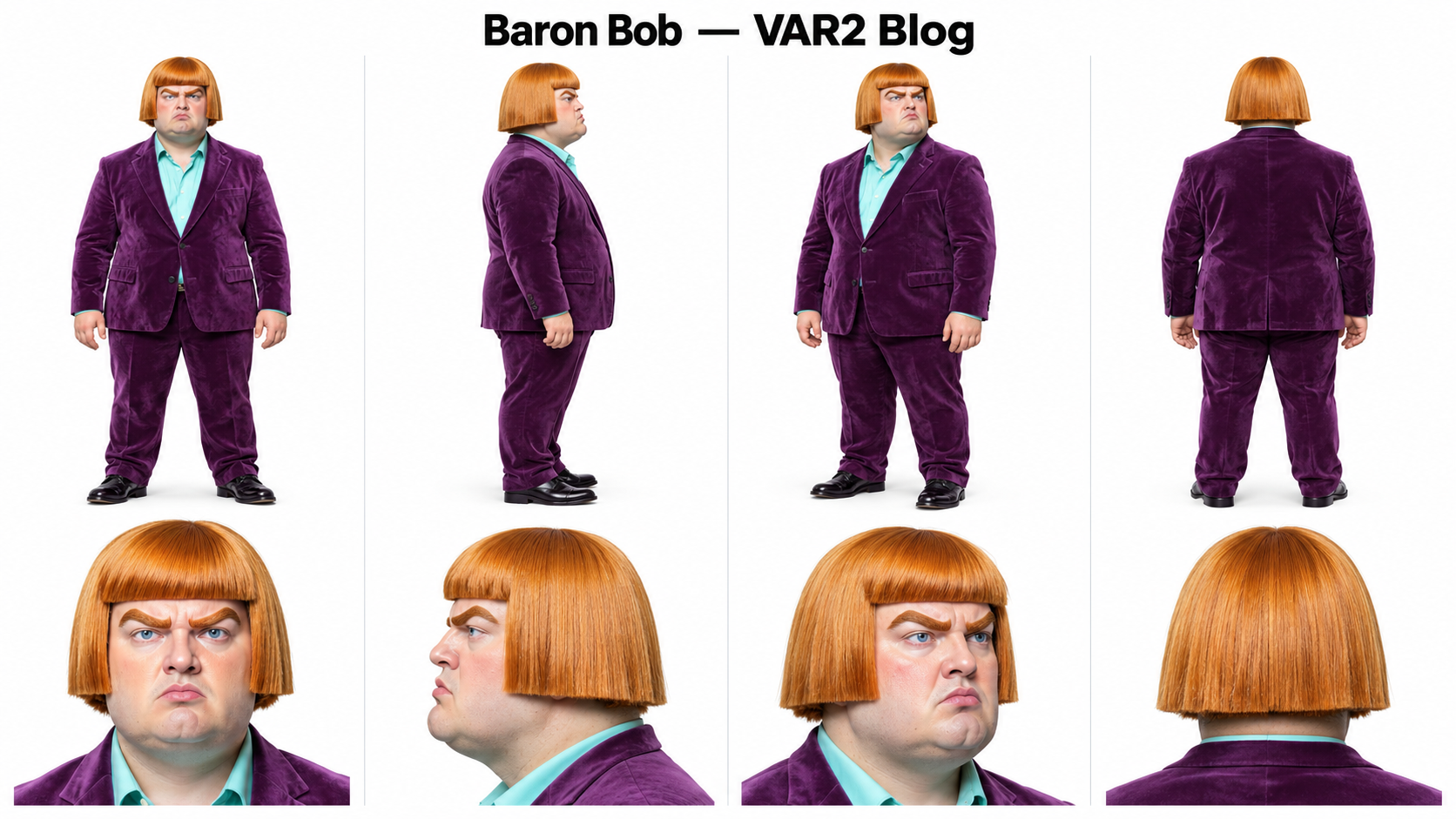
Baron Bob — Director of the Department of Square Things

A boxy orange bob, a deadpan expression and a purple velvet suit. We also asked for an exceptionally wide neck, but the result remained milder than the wording. That is a useful lesson: judge the image, not the intensity of your adjectives.
| Interface field | Recipe we tried |
|---|---|
| Style | extreme surreal caricature |
| Face shape | extremely square oversized block-shaped face |
| Hairstyle | oversized geometric box bob haircut |
| Body build | massive neck wider than head |
| Outfit | violet velvet suit turquoise shirt |
Suggested opening line: “I checked. This circle still isn’t square enough.”
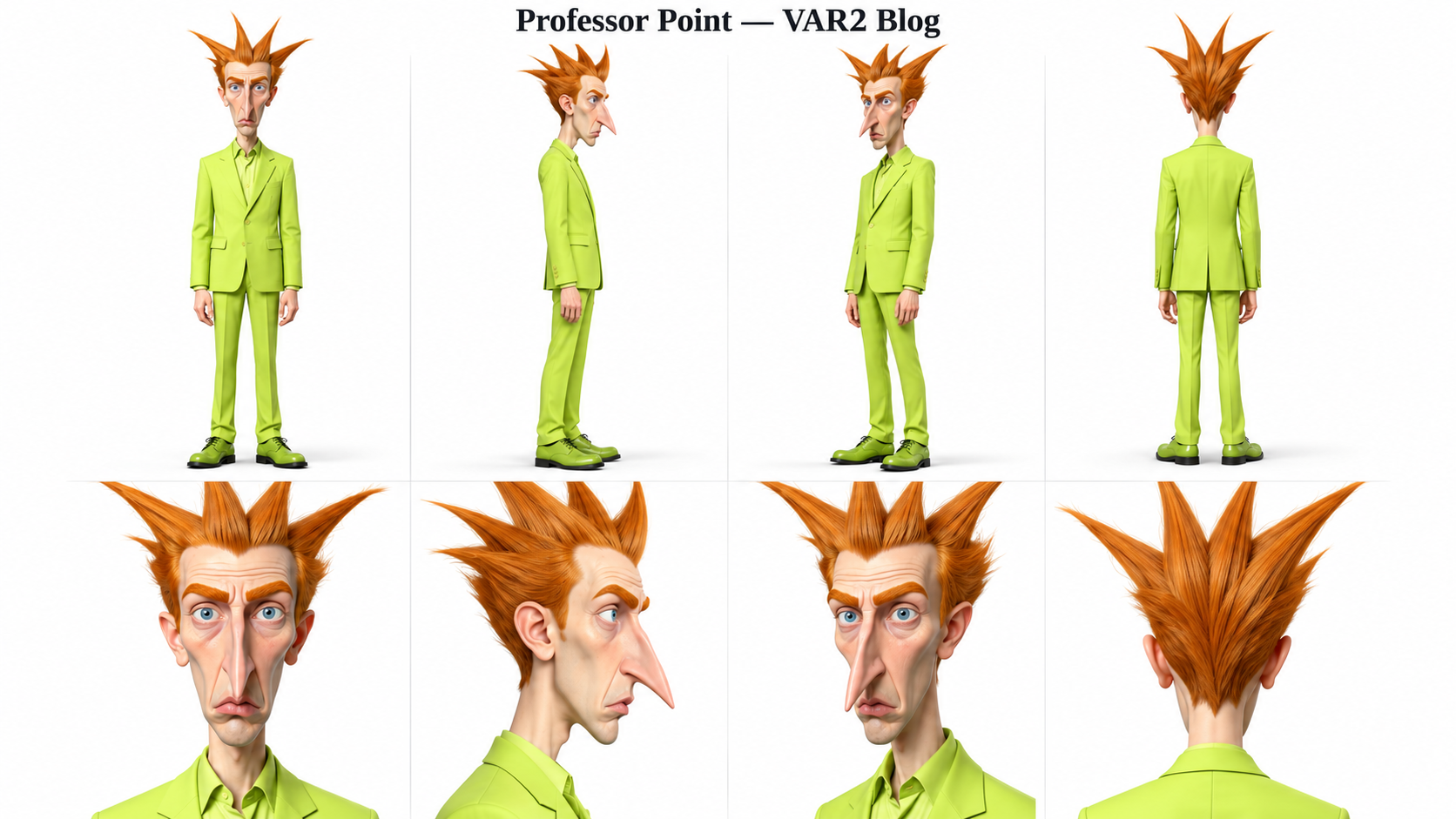
Professor Point — Expert in Unnecessary Explanations

An elongated pointed nose, a narrow face, zigzag hair and a lime suit. Repeating long, sharp shapes gives the character a coherent visual language before any explanation is added.
| Interface field | Recipe we tried |
|---|---|
| Style | extreme surreal caricature |
| Face shape | extremely elongated narrow angular face |
| Nose | enormous long pointed pencil nose |
| Hairstyle | three tall zigzag hair spikes |
| Outfit | lime green oversized professor suit |
Suggested opening line: “I have an important point. It’s right in front of you.”
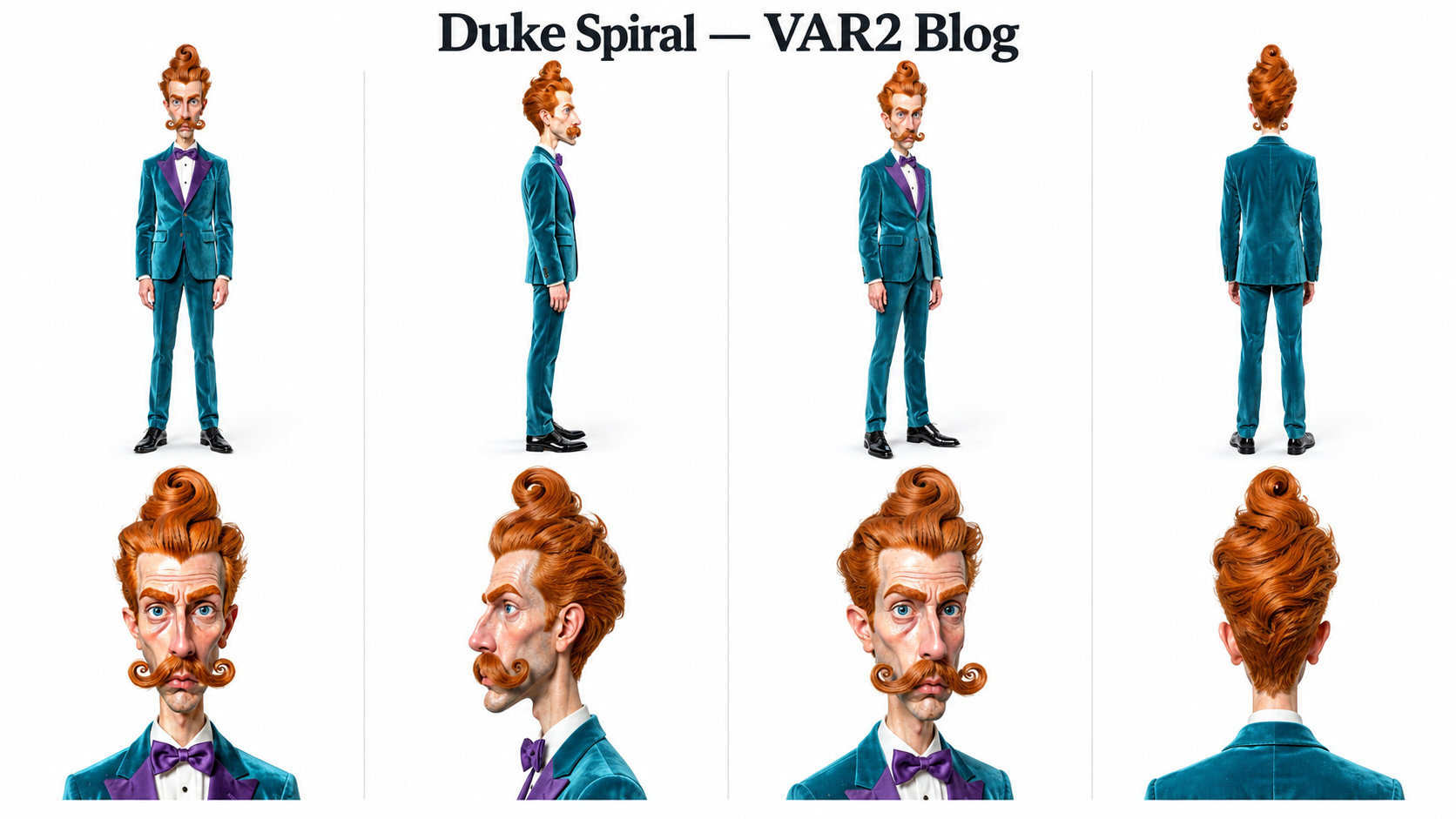
Duke Spiral — Coffee Critic of the Universe

A double-curled moustache, a tower of hair and a turquoise tuxedo. Repeating the spiral in the hair and facial hair creates a signature that can carry a recurring series.
| Interface field | Recipe we tried |
|---|---|
| Style | extreme surreal caricature |
| Facial hair | enormous double spiral curled moustache |
| Hairstyle | towering spiral cone pompadour |
| Outfit | turquoise velvet tuxedo purple bowtie |
Suggested opening line: “Excellent coffee. The final rotation of the aroma needs work.”
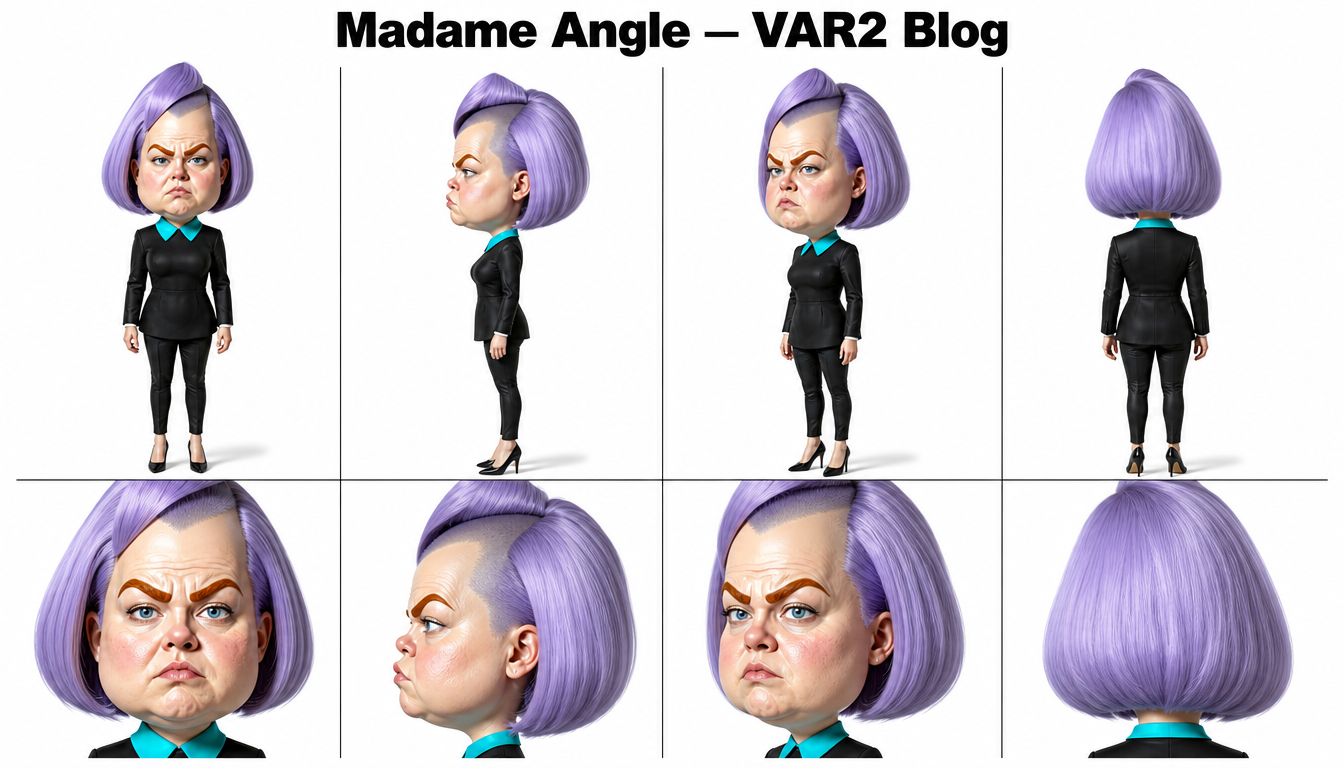
Madame Angle — Curator of Asymmetry

An oversized lavender bob with a shaved side, an emphasized head and black clothing with a turquoise collar. We first tried a triangular bob description; adding a shaved side made the asymmetry clearer in the preview.
| Interface field | Recipe we tried |
|---|---|
| Style | extreme surreal caricature |
| Hairstyle | asymmetric triangle bob shaved side |
| Hair color | Lavender — preset |
| Outfit | sculptural black dress turquoise collar |
Suggested opening line: “Beautiful. Now move everything three centimeters to the left.”
From a portrait to a reusable character reference
Create Character opens the naming and rendering step. The interface offers a high-quality reference sheet with four full-body angles and four face angles. After rendering, check that the hair, outfit and defining feature remain recognizable across views, then select Save to Quick Assets. Rendering and saving are separate steps.

Each character receives a hashtag, such as #duke_spiral__var2_blog, which the interface provides for mentions in prompts. A reference is a starting point for further production; it does not guarantee perfect identity preservation in every model. Inspect each new scene, particularly profiles, movement and extreme expressions.
Experiment cost: On October 10, 2026, live previews were free and the interface displayed 600 credits per character sheet. Four generations cost 2,400 credits. Pricing can change; use the amount shown on the generation button. This interface saves characters to Quick Assets. We selected purple and turquoise manually; automatic Brand Kit application was not used in this experiment.
Full reference sheets for all four characters: Baron Bob · Professor Point · Duke Spiral · Madame Angle
Turn the cast into a recurring content format
These are proposed scripts, not videos we have already produced. Give each character a repeatable behavior: the Baron tries to square objects, the Professor complicates simple explanations, the Duke treats coffee like fine art and Madame Angle rearranges the world. Change the situation while preserving the character’s habit.
| Suggested beat | What viewers see or hear |
|---|---|
| 0–2 seconds | Show the character and the problem immediately: a round cup on the Baron’s desk. |
| 2–6 seconds | One readable action: he turns toward the camera and raises a ruler. |
| 6–10 seconds | A short reversal: “Who approved this geometry?” |
| Ending | Return to the opening composition if it supports a natural loop. |
For a first test, compare two openings with the same character and duration. Track early retention, completions and shares relative to exposure. A UTM-tagged blog link separates visits from the experiment from other traffic. Keeping the character and format stable makes the comparison more useful than changing everything in every upload.
Continue with our guides to image-to-video consistency, voice direction and emotion, and Voice-to-Voice when the performance already works. Keep subsequent scenes and outputs together in your production project.
Custom AI character FAQ
Can I write Custom descriptions in Hebrew?
Yes. The interface says non-English text is translated into short English. We used English recipes in this experiment so readers can copy the exact wording.
How many words can each field contain?
Up to five. Describe visible shape, size, material or direction. A hairstyle field does not need a full character biography.
Will the same recipe generate the exact same character?
Not necessarily. The base identity, other attributes and history of changes also influence the result. Treat the recipes as starting points and save a reference of the version you like.
How do I make the character go viral?
There is no guarantee. A recognizable appearance can support an opening, but story, pacing, sound and audience response determine whether people keep watching and share.